How to Spot a Phishing Email: What Every Small Business Owner Should Know
Your Google Business Profile has been suspended. Your advertising account needs immediate verification. Your website domain is about to expire.
If you’ve received emails with messages like these, you probably know how quickly they can get your attention.
But what happens when the message isn’t really from Google, Meta, your website provider, or another company you trust?
That’s exactly what cybercriminals are counting on.
Phishing emails are designed to trick recipients into revealing sensitive information, visiting fraudulent websites, downloading malicious software, or sending money. And today’s phishing attempts can be surprisingly convincing, sometimes using familiar logos, professional language, and messages that appear to come from legitimate organizations.
For small business owners, falling for one of these messages could mean losing access to important accounts, exposing customer information, or disrupting daily operations.
Fortunately, you don’t have to be a cybersecurity expert to recognize common warning signs.
Let’s look at how phishing works, what suspicious emails often have in common, and the practical steps you can take to protect your business.
What Is Phishing, and How Does It Work?
Phishing is a type of cyberattack in which scammers impersonate trusted individuals or organizations to trick people into sharing information or taking actions that compromise their security.
Most people associate phishing with suspicious emails, but these attacks can also arrive through text messages, social media, messaging apps, and even phone calls.
A typical phishing email might appear to come from your bank, an online service, a business associate, or a familiar technology platform.
The message usually encourages you to take an action, such as:
- Clicking a link to verify your account
- Entering your username and password
- Downloading an invoice or other attachment
- Providing financial or personal information
- Sending a payment to an unfamiliar account
- Sharing a verification code
The scammer’s goal might be to steal your credentials, access your accounts, install malware, or redirect money.
For example, imagine receiving an email that appears to come from your website hosting provider. It claims there’s an urgent billing problem and that your website will be taken offline unless you update your payment information.
You click the link, arrive on a professional-looking website, and enter your account information.
Unfortunately, the website is fake, and you’ve just provided your information to someone pretending to be your hosting provider.
That’s what makes phishing so effective. The message doesn’t always look suspicious at first glance.
Why Should Small Businesses Be Concerned About Phishing?
You might assume cybercriminals focus primarily on major corporations, but smaller businesses can also be attractive targets.
A small business may depend on a handful of important accounts to manage daily operations, including business email, website hosting, payment systems, customer communications, and social media.
When one of those accounts is compromised, the effects can extend well beyond a single employee’s inbox.
A successful phishing attack could potentially lead to:
- Unauthorized account access: Criminals may gain control of business email, advertising accounts, or other platforms.
- Financial losses: Fraudulent invoices or altered payment instructions can redirect money.
- Website disruptions: Compromised credentials may give attackers access to website administration or hosting accounts.
- Exposure of sensitive information: Customer records, employee information, or financial details could be at risk.
- Reputation damage: Attackers might use a compromised business account to send fraudulent messages to customers or vendors.
And cybercriminals don’t always need sophisticated technical methods to succeed.
Sometimes, they simply need one busy employee to click the wrong link or trust an unexpected request.
7 Warning Signs of a Phishing Email
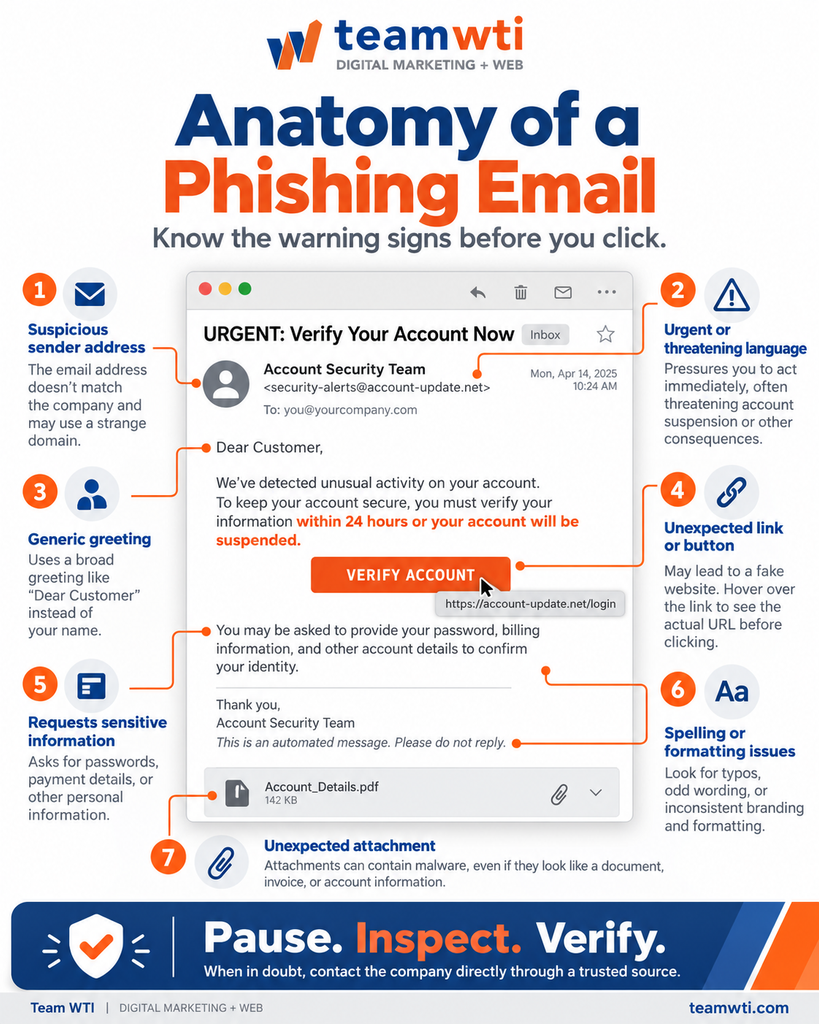
Phishing emails have become more sophisticated, but there are still common warning signs worth recognizing.
The important thing to remember is that no single warning sign proves an email is fraudulent. Likewise, an email that looks professional isn’t necessarily legitimate.
Here are seven things to watch for.
1. A Suspicious Sender Email Address
An email might display a familiar company name while coming from a completely unrelated address.
For example, the sender’s display name might say “Account Security Team,” but the actual email address could be something like:
security-alerts@account-update.example
The name sounds official, but the domain doesn’t establish any connection to the organization being impersonated.
Scammers can also use email spoofing techniques to make messages appear more legitimate.
What to do: Examine the sender’s full address. If something seems unusual, contact the organization using its official website or a phone number you already trust.
Remember, even an apparently legitimate sender address doesn’t guarantee that an email is safe.
2. Urgent or Threatening Language
Phishing emails frequently try to create a sense of urgency.
You might see messages such as:
- “Your account will be suspended within 24 hours!”
- “Immediate action required to avoid service interruption.”
- “Unusual activity detected. Verify your information now.”
- “Final notice: Payment required today.”
The goal is to make you react before taking the time to investigate.
Of course, legitimate companies sometimes send urgent notifications, too. That’s why the urgency itself isn’t proof of a scam.
What to do: Don’t let a deadline or threatening message pressure you into clicking. Visit the company’s official website independently to determine whether the issue is real.
3. Generic or Unexpected Greetings
Some phishing messages begin with greetings such as “Dear Customer,” “Valued Account Holder,” or “Dear User.”
These can be warning signs when the sender would normally know your name or business information.
However, some legitimate companies use generic greetings, and sophisticated phishing emails may include your actual name, company name, or other familiar details.
What to do: Consider whether the message matches the way the organization typically communicates with you.
A personalized email isn’t automatically trustworthy, either.
4. Suspicious Links or Unexpected Buttons
One of the most common phishing techniques involves directing recipients to fraudulent websites.
A button might say “Verify Your Account” or “Update Payment Information,” but the destination could be a website designed to collect your credentials.
On a desktop computer, hovering over a link may reveal its destination without opening it.
However, the visible link text can be misleading, shortened URLs can obscure destinations, and even websites with HTTPS connections can be fraudulent.
What to do: If an email asks you to log in, open your browser and navigate to the company’s official website yourself rather than using the email’s link.
5. Requests for Passwords or Sensitive Information
Be especially cautious of unexpected requests for:
- Account passwords
- Multifactor authentication or verification codes
- Credit card numbers
- Banking information
- Business account credentials
- Sensitive employee or customer information
A phishing message may direct you to a fake login page that looks almost identical to the real one.
Scammers may also request a one-time verification code to bypass account protections.
What to do: Never provide a password or authentication code in response to an unexpected request. If you believe your account needs attention, sign in through the official platform to investigate.
6. Spelling, Formatting, or Branding That Seems Wrong
Poor grammar and unusual formatting used to be some of the easiest ways to recognize phishing emails.
They’re still worth noticing, but they’re no longer reliable indicators on their own.
Scammers can create polished, convincing emails using professional templates, copied branding, and AI-generated language.
A fraudulent message may look almost identical to one sent by a legitimate organization.
What to do: Look beyond spelling and design. Check the sender, destination links, requested actions, and whether the communication makes sense.
A professional-looking email can still be a scam.
7. Unexpected Attachments
Phishing emails may contain attachments disguised as invoices, contracts, shipping documents, account statements, or other business files.
Some malicious attachments can install malware or exploit software vulnerabilities when opened.
For example, an unexpected email might claim that you owe money and include a document labeled “Outstanding Invoice.”
If you weren’t expecting an invoice from that sender, opening the attachment could put your device or business information at risk.
What to do: Verify unexpected attachments with the sender through a separate, trusted communication channel before opening them.
Common Phishing Emails That Target Small Businesses
Sometimes the easiest way to understand a phishing scam is to recognize the situations scammers try to exploit.
Here are four examples particularly relevant to business owners.
Fake Google Business Profile Suspension Notices
Your Google Business Profile is an important part of your online visibility.
A message claiming that your listing has been suspended, disabled, or requires immediate verification could naturally get your attention.
Scammers may use this concern to direct business owners to fraudulent pages requesting their Google account credentials.
How to verify: Sign in to your Google Business Profile through Google’s official platform and review any account notifications there.
Google can legitimately suspend profiles, so the goal is to verify the alert independently rather than assume every suspension notice is fake.
Social Media or Advertising Account Warnings
Businesses that use Facebook, Instagram, or other social media platforms may encounter messages claiming their business page or advertising account violates platform policies.
A typical suspicious message might say:
“Your advertising account has been restricted. Submit an appeal immediately to prevent permanent removal.”
The message may contain a link to a fake appeals page.
How to verify: Open the platform directly and review your account status and notifications.
Avoid submitting login information through unfamiliar links sent in emails or direct messages.
Website Domain Expiration or Hosting Notices
Imagine receiving a message stating:
“Your business domain expires today. Renew immediately to prevent website suspension.”
Domain expiration and hosting interruptions are legitimate concerns, which makes this type of message especially convincing.
However, scammers may send fraudulent renewal notices that direct website owners to unauthorized payment pages.
Some messages are designed to look like invoices even when the sender has no relationship with your domain registrar or hosting provider.
How to verify: Review your domain registration and hosting account directly, or contact your website provider using established contact information.
Don’t assume an invoice is legitimate just because it includes your domain name.
Fraudulent Invoices and Payment Requests
Not every phishing email tries to steal a password.
Some attackers impersonate vendors, clients, or company employees to redirect payments.
For example, you might receive an email that appears to come from a familiar supplier explaining that its banking information has changed.
The request could be fraudulent, even if it references an actual invoice or ongoing project.
How to verify: Independently contact the vendor or colleague using a previously verified phone number or communication channel before making payment changes.
For businesses, creating a consistent verification process for payment requests can be an important safeguard.
How to Check Whether an Email Is Legitimate
If something about an email seems suspicious, you don’t need to become a technical investigator.
A few simple steps can help you make a safer decision.
1. Stop before clicking.
Take a moment to review the message. Urgency is often part of the scam.
2. Check who actually sent the email.
Look at the full sender address rather than relying only on the displayed name or logo.
3. Consider whether you were expecting the message.
An unexpected invoice, account warning, or attachment deserves additional scrutiny.
4. Visit the company’s website independently.
Open a new browser window and use a known website address or saved bookmark to check your account.
5. Verify unusual requests through another channel.
If someone requests sensitive information or payment changes, confirm the request using a trusted phone number or another established method.
6. Report suspicious messages.
Use your email provider’s phishing-reporting feature or notify your business’s IT support contact.
The most important habit is simple:
When in doubt, verify the request independently before taking action.
What Should You Do If You Click a Phishing Link?
First, don’t assume that every accidental click means your accounts have been compromised.
What matters is what happened after you clicked.
Did you simply open a webpage? Did you download a file? Did you enter your password, share a verification code, or provide payment information?
The appropriate response depends on the situation.
If You Clicked a Link but Didn’t Enter Information
Close the suspicious page and don’t interact with it further.
If anything was downloaded, don’t open it. Have your IT support provider review the file and device as appropriate.
Keep your browser, operating system, and security software updated, and run a security scan if you suspect that something malicious was downloaded.
If You Entered Your Password
Act quickly.
- Navigate to the legitimate website independently and change your password.
- Change passwords on any other accounts where you reused that password.
- Enable multifactor authentication if it isn’t already active.
- Review recent account activity and unfamiliar sign-ins.
- Sign out of other sessions or revoke suspicious access where the service allows it.
- Notify your company’s IT or security contact.
If someone has already changed your password or you can’t access the account, follow the provider’s official account-recovery process.
If You Shared Financial Information
Contact the affected bank, credit card provider, or financial institution through its official contact channels.
Explain what happened and follow its recommendations for securing the account, reviewing transactions, and addressing potential fraudulent activity.
If Business Systems May Be Compromised
Notify the appropriate people within your organization immediately.
If you suspect malware or unauthorized system access, your IT or security provider may need to isolate affected devices, preserve relevant information, and investigate the incident.
Businesses that handle sensitive customer or employee information should also determine whether additional notification or reporting obligations apply.
Acting quickly can help reduce the potential damage of a phishing incident.
For additional guidance, review the Federal Trade Commission’s recommendations for responding to scams.
How Can You Protect Your Business From Phishing Attacks?
Recognizing suspicious emails is important, but businesses should also establish safeguards that reduce the chances of a successful attack.
Use Strong, Unique Passwords
Avoid using the same password across multiple business accounts.
A reputable password manager can help employees create and store strong, unique passwords without having to remember each one.
Enable Multifactor Authentication
Multifactor authentication (MFA) adds another layer of protection when signing in.
Even if someone obtains your password, MFA can make it more difficult for them to access your account.
Whenever available, consider phishing-resistant authentication methods, such as passkeys or security keys.
Employees should also know never to approve an unexpected login request or share a verification code with someone contacting them.
Keep Software and Websites Updated
Software vulnerabilities can create opportunities for attackers.
Keep operating systems, browsers, security software, website platforms, and plugins updated with applicable security patches.
For businesses using WordPress, maintaining current software and plugins is an important part of reducing website vulnerabilities.
Educate Employees About Common Scams
Phishing awareness shouldn’t be limited to the person managing your website or business email.
Anyone who receives emails, handles invoices, or manages online accounts could encounter a suspicious message.
Make sure employees understand how to recognize warning signs, verify unusual requests, and report concerns.
Establish Verification Procedures
Consider setting clear expectations for sensitive requests.
For example, require independent confirmation before employees change vendor banking details or approve unexpected transfers.
A short phone call to a known contact can prevent a costly mistake.
Use Appropriate Email and Website Security Protections
Email filtering, domain authentication technologies such as SPF, DKIM, and DMARC, reliable backups, security monitoring, and appropriate access controls can provide additional layers of protection.
No single tool will eliminate every phishing threat.
The strongest approach combines technical safeguards, updated systems, and employees who know when to question an unexpected request.
Think You Can Spot a Phishing Email? Take Google’s Quiz!
Now for something a little more interactive.
Google’s Jigsaw team created a phishing quiz that challenges users to determine whether different email examples are legitimate or fraudulent.
It’s a useful way to practice recognizing suspicious messages and understanding which details deserve closer attention.
And even people who work with websites and suspicious messages regularly can miss something.
In fact, the original version of this Team WTI article included an admission from its author: despite being familiar with hacked websites and phishing attempts, they scored just 7 out of 8 on the quiz!
It’s a good reminder that recognizing scams isn’t always as easy as we think.
Consider sharing the quiz with your employees, too. It can be a useful starting point for conversations about email security.
Just remember that a passing score doesn’t guarantee you’ll recognize every future phishing attempt. Scammers continually change their methods.
Frequently Asked Questions About Phishing Emails
Yes. Scammers can imitate familiar company logos, email designs, sender names, and websites. Some attacks even reference real business details to make messages more convincing.
Always verify unexpected requests through trusted channels, even when an email appears professional.
Phishing emails can contain malicious links or attachments that lead to malware infections.
Simply receiving or reading an email doesn’t automatically mean your device is infected. However, opening malicious attachments, downloading files, or interacting with compromised websites can create risks.
Keep your software updated and avoid interacting with suspicious content.
Avoid clicking links, downloading attachments, or replying with sensitive information.
If the email appears to come from a company you use, contact that organization independently through its official website or trusted contact information.
Report the suspicious email through your email provider or your company’s IT support process.
You can report phishing attempts through your email provider and to the Federal Trade Commission at ReportFraud.ftc.gov.
Suspicious phishing emails can also be forwarded to the Anti-Phishing Working Group at reportphishing@apwg.org.
If the message involves your business, notify the appropriate internal contact so other employees can be alerted.
No. Security software can help identify and block certain malicious files or activities, but phishing also relies on manipulating people into providing information or authorizing fraudulent actions.
Strong passwords, multifactor authentication, employee education, software updates, and verification procedures are all important parts of a broader security strategy.
Protecting Your Business Starts With Paying Attention
Phishing emails aren’t going away, and cybercriminals will continue looking for new ways to make fraudulent messages appear trustworthy.
But there’s good news: recognizing suspicious requests, verifying information independently, and maintaining good security practices can help businesses reduce their exposure to common scams.
You don’t need to investigate every email like a cybersecurity professional.
You just need to develop the habit of stopping, looking closely, and asking questions before taking action.
At Team WTI, we understand how important a reliable online presence is to your business. While cybersecurity incidents and compromised accounts may require assistance from qualified IT or security professionals, keeping your website software and hosting environment properly maintained is another important part of protecting your digital operations.
Our website hosting services and website maintenance solutions help businesses keep their websites updated, monitored, and running reliably.
Contact Team WTI to learn more about how our hosting and website maintenance services can support your business’s online presence.
And the next time an email claims your account is about to disappear unless you click immediately?
Pause. Inspect. Verify.
A few extra moments of caution could make all the difference.