Internal Linking for SEO: Why It Matters and How to Do It Right
A well-designed website should do more than provide information one page at a time. It should help visitors move naturally from one useful resource to the next while making it clear how different pages and topics relate to each other.
That is where internal linking comes in.
Internal links help visitors discover relevant information throughout your website. They also help search engines understand your site structure, discover pages, and recognize relationships between your content.
Used strategically, internal linking can support SEO, user experience, content organization, and conversions—making it an important part of a broader digital marketing strategy.
What Is an Internal Link?
An internal link is a link from one page on your website to another page on the same website.
For example, a digital marketing article discussing search engine optimization might link to an SEO services page for readers who want to learn more. A blog about keyword research could link to another resource about search intent because the two subjects are closely related.
Internal links can appear in:
- Blog articles
- Service and product pages
- Navigation menus
- Related-content sections
- Calls to action
- Breadcrumb navigation
- Other relevant areas throughout a website
While navigation links are important, contextual internal links within the main content of a page can be especially useful because they connect readers directly with information related to what they are already reading.
Why Are Internal Links Important for SEO?
Search engines don’t view every page of a website as an isolated piece of information. They crawl links between pages to discover content and better understand how a website is organized.
A thoughtful internal linking strategy can help search engines determine:
- Which pages exist on your website
- How different pages relate to one another
- Which pages provide supporting information about a larger topic
- How your website is structured
- Which pages appear to be particularly important within that structure
Imagine a website with a primary SEO services page supported by articles about keyword research, technical SEO, content optimization, local SEO, internal linking, and AI search.
When those resources are logically connected through internal links, they create a much clearer picture of the website’s overall coverage of the subject.
Instead of publishing a collection of disconnected articles, you’re creating an organized network of useful, related information.
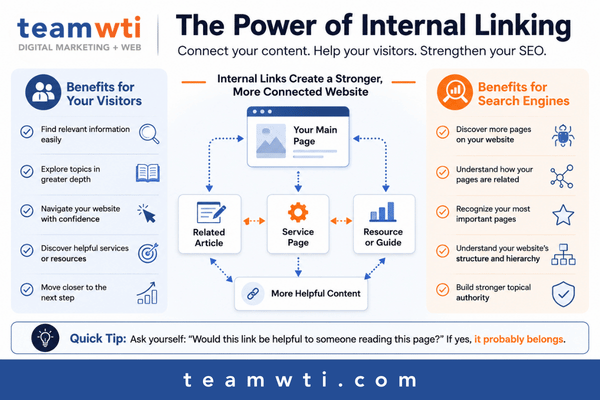
Internal Links Help Visitors, Too
SEO isn’t the only reason to use internal links.
Think about what happens when someone arrives on your website with a question. One page may answer the initial question—but often, that answer leads to another question.
A useful internal link gives the visitor an easy next step.
For example, someone reading about the importance of SEO may want to know how keyword research works. Someone learning about keyword research may next want to understand search intent.
Strategically placed internal links can help visitors:
- Find related information
- Explore a topic in greater depth
- Discover relevant products or services
- Navigate your website more easily
- Find answers without repeatedly returning to a menu or search function
- Move naturally toward the next step in their journey
This makes internal linking an important part of user experience as well as SEO.
Internal Linking Can Strengthen Your Website’s Topical Organization
Modern SEO isn’t simply about optimizing individual pages for individual keywords. Search engines also need to understand the subjects your website covers and how individual pieces of content fit together.
Internal linking can help establish those relationships.
Suppose you have a comprehensive page about SEO. You might also have supporting articles covering topics such as:
- Keyword research
- Technical SEO
- Search intent
- Local SEO
- Content optimization
- Internal linking
- GEO and AI search
Those supporting resources can link back to the primary SEO page and, where appropriate, to one another.
This type of structure helps create a logical content ecosystem around a larger subject.
The key isn’t linking pages together simply because they contain similar keywords. Links should exist because there is a meaningful relationship between the content and because following the link could benefit the reader.
What Is Anchor Text, and Why Does It Matter?
Anchor text is the clickable text used for a link.
Consider these two examples:
Less descriptive:
“Click here to learn more.”
More descriptive:
“Learn more about developing an effective SEO strategy.”
Descriptive anchor text gives users a better idea of what they will find when they follow the link. It can also provide search engines with additional context about the destination page.
That doesn’t mean every internal link pointing to a particular page should use the exact same keyword phrase.
Anchor text should be natural, descriptive, and relevant to the surrounding content. Variations are perfectly appropriate when they accurately describe the page being linked to.
How Many Internal Links Should a Page Have?
There isn’t a magic number of internal links that every page needs.
A lengthy, comprehensive resource may naturally contain many useful internal links, while a short service page may only need a few.
Instead of trying to reach a specific number, ask:
Does this link genuinely help someone reading this page?
If the answer is yes, it may belong there.
Adding links simply to increase the number of links on a page can make content distracting and difficult to read. Internal links should enhance the experience—not interrupt it.
Don’t Forget About Orphan Pages
An orphan page is a page that has few or no internal links pointing to it from other pages on the website.
Even great content can become difficult to discover when it is disconnected from the rest of the site.
That’s why internal linking shouldn’t only happen while writing a new page.
When you publish new content, look for opportunities within your existing content to link back to the new resource.
For example, if you publish a new guide about internal linking, an older article about SEO best practices may already contain a section where linking to the new guide would be helpful.
This creates a two-way process:
New content → Relevant existing content
and
Relevant existing content → New content
Regularly revisiting older content can help build a stronger, more connected website over time.
Common Internal Linking Mistakes
Internal linking is relatively simple, but several common mistakes can reduce its usefulness.
Adding Links Just for SEO
Every link should have a purpose. If a link doesn’t provide additional value or context, it probably doesn’t need to be there.
Using Vague Anchor Text
Generic phrases such as “click here” or “read more” don’t tell readers much about where the link will take them. Descriptive anchor text usually creates a better experience.
Overusing Keyword-Rich Anchor Text
Descriptive anchor text is helpful, but repeatedly forcing the exact same keyword phrase into links can make content sound unnatural. Write for clarity first.
Linking to Irrelevant Pages
Two pages don’t need to be linked simply because they mention similar words. There should be a logical reason for a visitor to move from one resource to the other.
Publishing New Content Without Linking to It
Don’t let a new article sit by itself. Look through existing pages and articles for relevant opportunities to point visitors toward it.
Forgetting to Check Old Links
Websites change over time. Pages may be removed, URLs may change, or content may be consolidated. Periodically checking internal links helps prevent visitors and search engines from encountering unnecessary dead ends.
How to Build a Better Internal Linking Strategy
You don’t need to completely restructure your website overnight. Internal linking can be improved gradually as part of ongoing SEO and content maintenance.
Start by identifying your most important pages, such as your primary services, products, or cornerstone resources.
Then look at the content that supports those pages.
Ask yourself:
- What is the main subject of this page?
- What other pages provide useful supporting information?
- Is there a primary service or resource this page should connect to?
- What might the reader reasonably want to know next?
- Are there older pages that should link to this content?
These questions shift the focus away from simply “adding links” and toward creating useful pathways through your website.
What About Internal Linking and AI Search?
Search continues to evolve as traditional search engines incorporate more AI-driven experiences and people increasingly use AI tools to discover information.
That doesn’t make good website structure less important.
Clear page organization, descriptive language, relevant supporting content, and logical relationships between resources all contribute to making website content easier to understand.
Internal linking alone won’t guarantee that your website appears in an AI-generated answer. However, it is one component of building a well-organized, authoritative body of content that clearly communicates what your business knows and how its resources relate.
In other words, the fundamentals still matter—even as the ways people search continue to change.
Internal Linking Checklist
Before publishing or updating a page, consider the following:
- Link to relevant supporting resources where they genuinely help the reader.
- Use descriptive, natural anchor text.
- Connect supporting content to important service, product, or cornerstone pages.
- Look for older content that could link to your newly published page.
- Avoid adding links simply to reach a certain number.
- Check that links lead to current, relevant pages.
- Look for orphaned or difficult-to-discover content.
- Think about the reader’s next logical question when choosing links.
Frequently Asked Questions About Internal Linking
Do internal links help SEO?
Yes. Internal links can help search engines discover pages, understand website structure, and recognize relationships between related content. They can also improve navigation and help users discover more of your website.
What is the difference between an internal link and an external link?
An internal link connects one page on your website to another page on the same website. An external link points from your website to a page on another website.
Both can be valuable, but they serve different purposes.
Should every page have internal links?
Most useful website pages will naturally benefit from links to or from other relevant pages. The goal, however, isn’t to force links onto every page. Links should make sense within the website’s structure and provide value to the visitor.
How many internal links should I use on a page?
There is no universal number. Use as many internal links as are genuinely useful and relevant to the content. A comprehensive guide may naturally need more links than a short page.
What is an orphan page?
An orphan page is a page with few or no internal links pointing to it from elsewhere on the website. These pages can be harder for users to discover and may be more difficult for search engines to understand within the context of the rest of the site.
Can you have too many internal links?
Yes, particularly when links are added without a clear purpose. Too many unnecessary links can clutter a page and distract readers. Focus on relevance and usefulness rather than quantity.
Make Every Link Have a Purpose
Internal linking may seem like a small part of SEO, but it can have an important role in how people and search engines experience your website.
The strongest internal linking strategies aren’t built by inserting links wherever possible. They’re built by understanding how your content fits together and creating clear paths between useful, related resources.
As your website grows, your internal linking strategy should grow with it.
Regularly reviewing existing pages, connecting new resources with older content, improving anchor text, and identifying orphaned pages can help turn a collection of individual webpages into a more organized, useful, and search-friendly website.
Want to strengthen your website’s SEO strategy? Learn more about how Team WTI’s SEO services can help improve your site’s content, structure, and visibility in an evolving search landscape.